Cover Sheet
Cover Sheet
Overview
The Cover Sheet is a powerful analytics tool designed specifically for the oil and gas industry. It provides a consolidated view of key operational data and calculations necessary for monitoring and decision-making processes. This feature allows users to quickly assess vital information tailored to their specific needs, facilitating better operational oversight and efficiency.
Key Features
- Customizable Data Points: Users can select and organize data fields relevant to their operations, such as production volumes, operational status, and key performance indicators (KPIs).
- Automated Calculations: Includes built-in formulas that automatically compute necessary values like flow rates, cumulative production over time, and other critical operational metrics.
- Real-Time Data Integration: Dynamically integrates data from various sources to provide up-to-date information, ensuring that decision-makers have the most current data at their fingertips.
- Email Delivery: The Cover Sheet is delivered directly to users via email, ensuring that critical operational data is always accessible and easy to review.
Cover Sheet Schedule
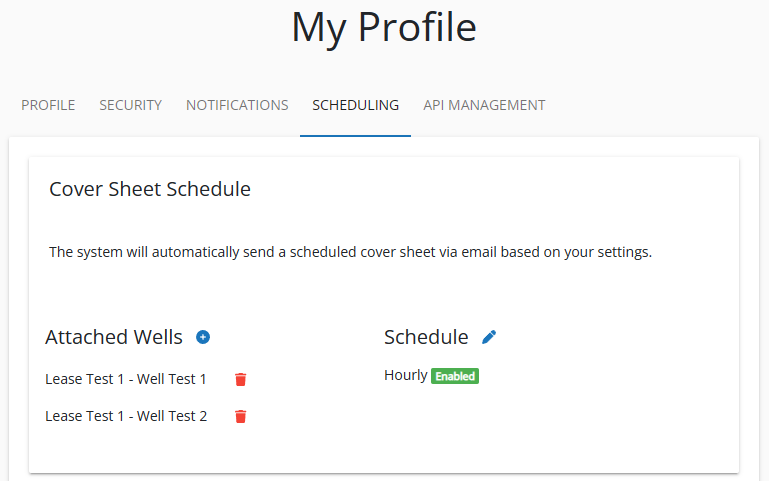
The system allows you to set a schedule for receiving the Cover Sheet via email, ensuring you get timely updates based on your needs. You can define this schedule in your user profile under the scheduling tab.
Setting Up a Cover Sheet Schedule
- Navigate to Scheduling: Log into your account and go to your user profile. Select the Scheduling tab.
- Attach Wells: Choose the wells you want to include in your Cover Sheet.
- Define the Schedule: Select how often you wish to receive the Cover Sheet. The options are:
- Hourly: Receive an update every hour.
- Daily: Select one or multiple times during the day to receive updates (e.g., 9 AM, 12 PM, 3 PM).
- Weekly: Choose one or multiple times and specific days of the week for updates (e.g., Mondays and Wednesdays at 6 AM and 6 PM).
- Save Your Settings: Once you have attached the wells and set your desired schedule, save your changes.
The system will automatically send the scheduled Cover Sheet to your inbox based on the settings you defined. This feature ensures that you always have access to the most current data without having to manually request updates.
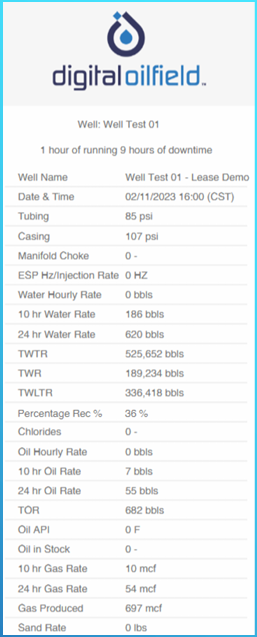
Cover Sheet Example
Here is an example of the Cover Sheet delivered to your inbox.